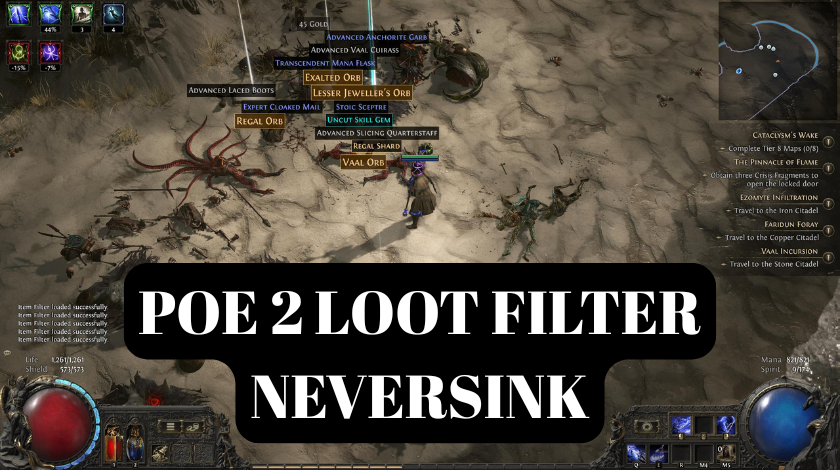
If you are just starting your journey in Path of Exile 2, you are probably already feeling the rush of defeating a massive boss or clearing a room full of monsters. It is an amazing feeling, but it quickly leads to a very big problem. When those monsters die, they drop a mountain of items. At first, you might try to read every single name on the ground. You see white items, blue items, and maybe a few yellow rare items. Within five minutes, your screen is so covered in text that you can barely see where your character is standing. This is what we call the loot explosion, and without some help, it can make the game feel overwhelming and exhausting. You spend more time reading labels on the ground than actually fighting monsters.
This is exactly why the name Neversink is so famous in the community. Neversink is a legendary developer who created a tool that almost every single player uses to stay sane. His loot filter acts like a smart assistant that sits between the game and your eyes. It looks at every item that drops and decides if it is worth your time. If an item is junk, the filter hides it. If an item is valuable, the filter makes the text larger, changes the color, and even plays a loud sound to make sure you do not walk past it. The goal of this guide is to take you from a confused beginner to someone who can fly through maps, only picking up the items that actually matter. We want to make your game playable, and more importantly, we want to make it profitable.
What Exactly is a Loot Filter in PoE 2?
To understand why you need a filter, you first have to understand the concept of visual clutter. In Path of Exile 2, the game developers want to give you a lot of loot because finding items is the core of the game. However, about 95 percent of that loot is not useful for your specific character. Some items are for different classes, some are too low-level, and some are just common items with no special stats. If the game showed you everything, you would be clicking on trash all day. A loot filter is a simple script that the game reads. It tells the game things like, if a life potion is lower than level 20, do not show it on my screen. This cleans up the visual space and lets you focus on the action.
The evolution from the first Path of Exile to the second version has brought some changes to how filtering works. In the original game, there was an incredible amount of garbage items. In Path of Exile 2, the developers have tried to make the loot a bit more meaningful, but the volume is still very high. Also, new mechanics like gold and different types of crafting materials mean your filter needs to be smarter than ever. A good filter does not just hide items, it also categorizes them. It might put a border around an item that has a high potential for crafting, or it might change the background color of a currency item so you know instantly how rare it is. It turns a messy pile of words into a organized, color-coded menu of rewards.
Getting Started with Filterblade for PoE 2
The best way to get your hands on a Neversink filter is through a website called Filterblade.io. This is the official home for his work and it is designed to be very user-friendly. When you first open the site, you might see a lot of options for the first Path of Exile game. You must be very careful here. Make sure you look for the toggle or the specific section dedicated to Path of Exile 2. Because the two games have different items, using a filter meant for the first game will simply not work. It might even cause errors that prevent any loot from showing up at all. Once you have selected the PoE 2 version, you are ready to start the setup.
The most powerful feature of Filterblade is the ability to link your official Path of Exile account. I always tell new players to do this right away. There is a button to log in with your game account. Once you do this, you can save your filter directly to your account in the “cloud.” This means you do not have to download any files or move them into folders on your computer. When you save a filter on the website, it automatically appears in your game menu. This is a huge time-saver, especially because Neversink updates the filters often. If he changes a setting to account for a change in the game’s economy, you can just hit the refresh button on the site and your game will be updated instantly.
Understanding Neversink’s Strictness Levels
One of the most common questions I get is about strictness levels. Neversink provides several presets, ranging from Regular to Uber-Strict. If you are a beginner or you are just starting a new character, you should almost always start with the Regular setting. At this level, the filter is very forgiving. it will show you most of the items that could be useful, including basic crafting bases and most rare items. It is perfect for the campaign where you need to find gear to survive. You want to see those items because you are constantly upgrading your boots, your helmet, and your weapons.
As you get into the later stages of the game, like the endgame maps, you will notice that even the Regular filter shows too much. This is when you move to Semi-Strict or Strict. At the Strict level, the filter starts hiding low-value rare items and common crafting materials that you already have hundreds of. My personal recommendation is to stay on Semi-Strict until you feel like you are leaving more than half of the items on the ground. Once you feel that frustration of clicking on too many things that are not worth much, that is your signal to move up a level. For the top 1 percent of players who move incredibly fast, there are the Very Strict and Uber-Strict levels. These are dangerous for beginners because they hide almost everything. You could walk right past a decent upgrade and never know it. Save those levels for when you are a veteran with a very expensive character.
How to Install and Load Your Filter
If you chose not to link your account, you will have to use the manual download method. This is still a good skill to have. On the Filterblade site, you can go to the “Download” tab and save a file that ends in .filter. You then need to find your Path of Exile 2 folder. Usually, this is located in your Documents folder under My Games, then Path of Exile 2. You just drop the file in there. It is a bit more work, but some people prefer it because they like to keep backups of their filter files on their own hard drives.
Once the file is in the folder, or once you have synced your account, you need to tell the game to use it. Open Path of Exile 2 and go into the Options menu. Look for the “Game” or “UI” tab and scroll down until you see “List of Loot Filters.” If you did everything correctly, you should see “Neversink” or whatever name you gave your filter in the dropdown menu. Select it and hit the “Save” or “Apply” button at the bottom. You will usually see a message in the chat box that says “Loot Filter loaded successfully.” If you see that message, you are good to go. If you see an error in red text, it usually means the filter is outdated or for the wrong version of the game.
Customizing Your Experience
The real beauty of using Filterblade is the customization. You are not stuck with the colors and sounds that Neversink chose. Maybe you have a hard time seeing the color blue against the floor of a specific map. You can go into the customization settings on the website and change the background of those items to a bright orange or a neon green. I personally like to make my currency items very bright and bold. I also like to increase the font size for things like “Orbs of Alteration” so I can click them easily without having to be super precise with my mouse.
Sound is another big part of the experience. We all know the classic “ding” or “shwing” sound that plays when something good drops. In Filterblade, you can actually choose different sound packs. You can even upload your own sounds if you want to get fancy. I have a friend who set his filter to play a funny meme sound whenever a very rare item drops. While that might be a bit much for most people, it shows how much control you have. You can also tell the filter to hide specific item types that you personally find annoying. For example, if you never plan on playing a character that uses bows, you can tell the filter to hide all bow bases, even the high-level ones. This keeps your screen even cleaner and helps you stay focused on your own goals.
Why Neversink is Trusted (EEAT Perspective)
You might wonder why everyone uses Neversink instead of making their own filter from scratch. The reason comes down to experience and trust. Neversink has been doing this for over a decade. He understands the math behind the game better than almost anyone. When a new league starts, the value of items changes. For example, in one league, a certain type of fossil might be worth a lot of gold, but in the next league, it might be worthless. Neversink and his team watch the market constantly. They update the filter logic so that the colors and sounds match the actual value of the items in the current economy.
This reliability is why the community trusts him. When you use his filter, you are benefiting from the collective knowledge of the best players in the game. It is a massive project that is updated almost daily during the first few weeks of a new game launch. I have used his filters since I first started playing, and I have never felt like I was missing out on something important. He also works closely with the developers at Grinding Gear Games to make sure his tools are safe and follow all the rules of the game. Using his filter is not cheating, it is just playing the game efficiently.
Common Troubleshooting Issues
Even the best tools have problems sometimes. The most common issue is the filter simply not appearing in the game menu. If this happens to you, double-check that you are looking at the right folder. Sometimes players accidentally put their PoE 2 filters in their PoE 1 folder. Another common problem is the “Outdated Filter” warning. This happens after the game gets a big update. The game developers might change the name of an item, and the filter doesn’t recognize it anymore. To fix this, you just need to go back to Filterblade, load your save, and hit the update button.
Sometimes, you might feel like you are not seeing any loot at all. If you think the filter is hiding too much, you can hold down the “Alt” key on your keyboard while you are standing over a pile of dead monsters. This will temporarily show you everything that is hidden. If you see a lot of items that you actually wanted to pick up, that is a sign that your strictness level is set too high. Simply go back to the settings and drop it down from Strict to Semi-Strict. It is better to see a little bit of extra junk than to miss out on an item that could make your character stronger.
Conclusion
In the end, playing Path of Exile 2 without a Neversink loot filter is like trying to find a needle in a haystack while someone is throwing more hay at you. It is a tool that transforms the game from a cluttered mess into a clear, goal-oriented experience. By taking a few minutes to set up Filterblade and link your account, you are setting yourself up for success. You will move faster, make more money, and have more fun. Do not be afraid to experiment with the different strictness levels and colors until the game feels just right for you. The most important thing is that the filter should work for you, not the other way around. Once you have it dialed in, you can stop worrying about the labels on the ground and start enjoying the incredible combat and world of PoE 2.
Frequently Asked Questions
1. Is it safe to link my Path of Exile account to Filterblade?
Yes, it is very safe. Filterblade uses the official Path of Exile API for logging in. This means they never see your password. They only get a special “token” that allows them to upload filter files to your account. Thousands of players, including the top streamers, use this method every day.
2. Does the loot filter slow down my computer?
Not at all. The loot filter is a very small text file. The game is designed to read these files extremely quickly. In fact, using a loot filter can actually improve your performance because your computer doesn’t have to render the text for hundreds of junk items on the screen.
3. Can I use the same filter for all my characters?
You can, but it might not be the best idea. If you have a high-level character, you probably want a very strict filter. If you then start a brand new character at level 1, that strict filter will hide everything you need to start your journey. I usually keep two or three different filters saved on my account so I can switch between them depending on which character I am playing.
4. What is the difference between a rare item and a currency item in the filter?
Rare items are pieces of gear like swords or armor that have yellow text. Currency items are things like gold or orbs that you use to craft or trade. A good filter will treat these very differently. It will usually give currency items a special sound and a bright color, while rare items will have more subtle colors unless they have a very high item level.
5. Why do some items have a big colored beam of light shooting out of them?
This is a feature of the Neversink filter to make sure you do not miss the most valuable items in the game. If an item is extremely rare, the filter will tell the game to show a vertical beam of light. This beam stays there even if you walk away, so you can always find your way back to the treasure.